AudioMark

AudioMark

Precision Listening  ·  Pro A/B Referencing  ·  Level-Matched Playlists

Professional A/B comparison and marker tool for mixing engineers and audio students. Automatically balance volume across mixed-quality playlists to reference your mixes against commercial masters without the volume distraction. Fully private — no cloud, no ads.

🔒 100% Offline 🎧 A/B Compare 📝 Markers 🎤 Record 📊 LUFS Analysis 🎛️ Playlist Level Match 🔊 Soundcard Select 🎚️ Auto-Gain & Limiter ⏰ Scheduled Playback 📜 Playback History 🌐 EN · DE · NO · ES · PT · FR
▶ Get it on Google Play
AudioMark — Mark, Loop, Record, Compare

See it in action

Watch AudioMark's key features — mark, compare, record, loop, and landscape mode.

AudioMark — Quick Intro
Quick IntroWatch on YouTube ↗
AudioMark — Loop & Markers
Loop & MarkersWatch on YouTube ↗
AudioMark — A/B Compare
A/B CompareWatch on YouTube ↗
AudioMark — Recording
RecordingWatch on YouTube ↗
AudioMark — Landscape Mode
Landscape ModeWatch on YouTube ↗

Everything you need

Professional audio tools in your pocket — no cloud, no sign-up, no nonsense.

🎧

Play & Mark

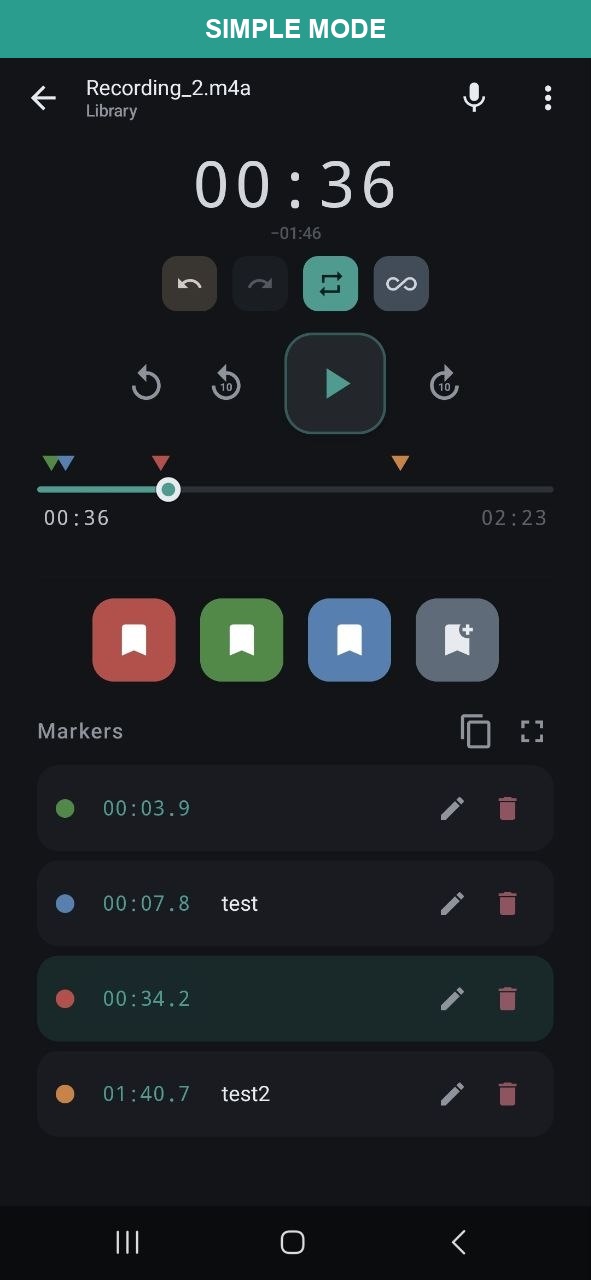
Import MP3, WAV, M4A, or FLAC. Place colour-coded markers while listening. Edit notes, tags, and precise timestamps. Drag to adjust. Full undo/redo.

Pro A/B Referencing

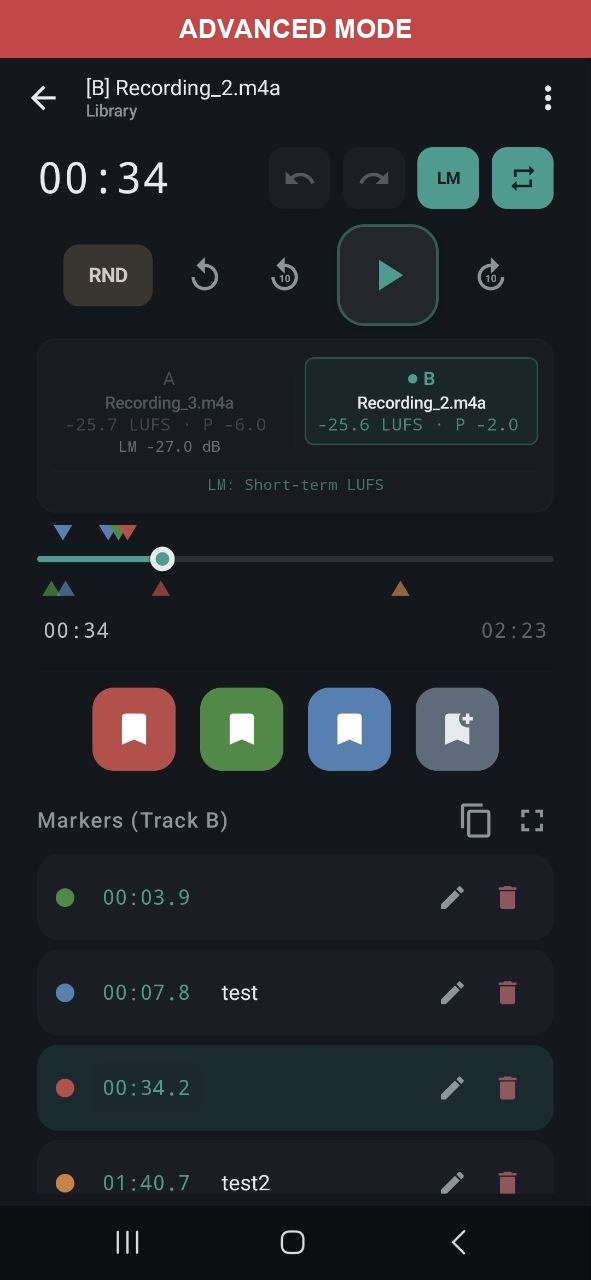
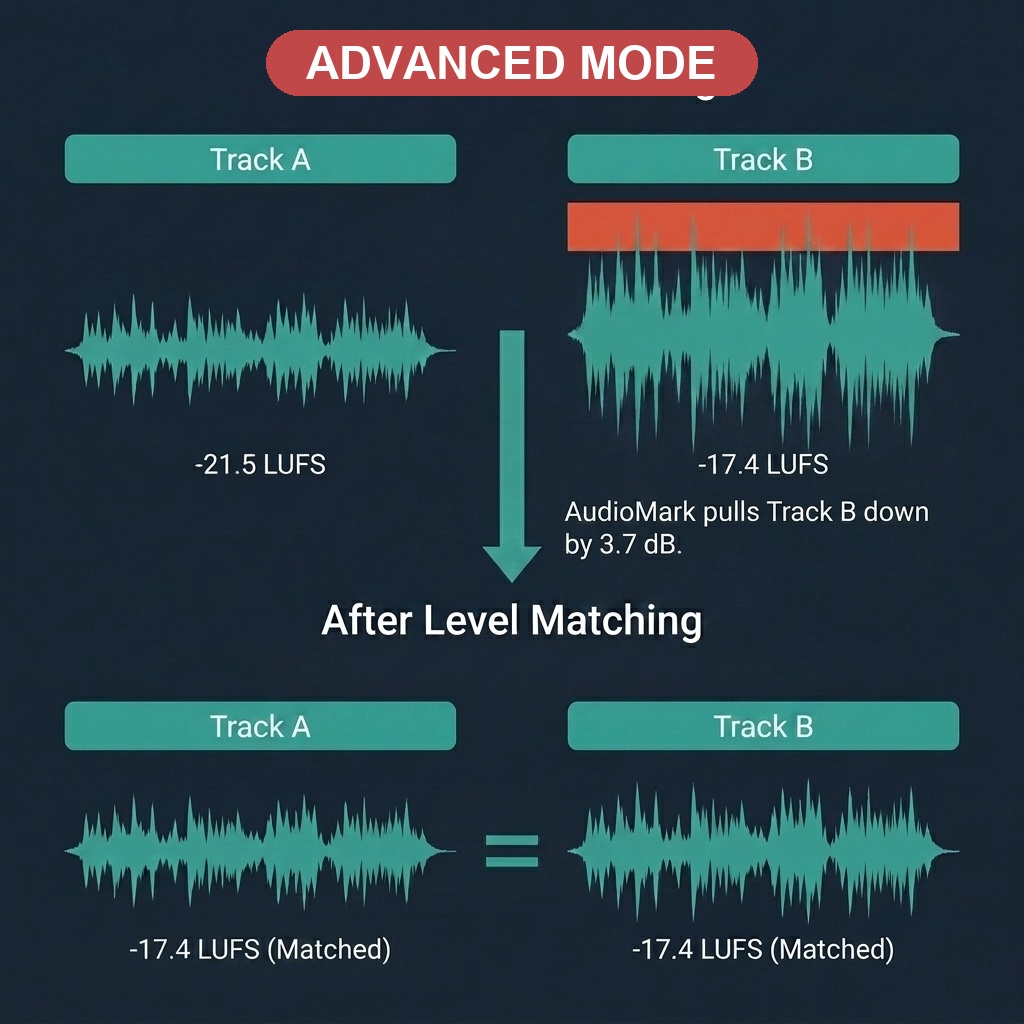
Compare tracks with clinical accuracy using 50ms equal-power crossfades. LUFS-based level matching (EBU R128) ensures you compare the actual sound and frequency balance, not just the volume.

🎤

Record

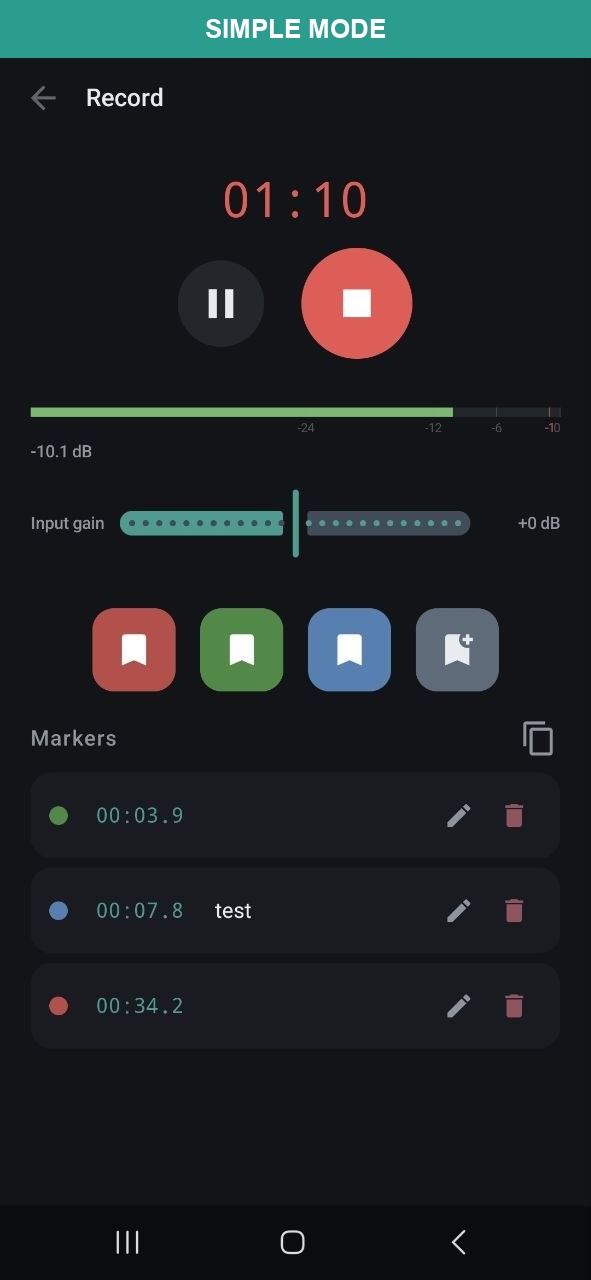
Record with real-time level meter and live marker placement. Lossless WAV (16-bit, 44.1 kHz) or compact AAC/M4A. Auto-imported when done.

🔊

Soundcard Selection

Select input and output audio devices — built-in mic, USB audio interfaces, Bluetooth, wired headsets. Auto-fallback when a device is disconnected. Specs shown per device.

🎚️

Auto-Gain & Compressor

Built-in gentle compressor with adaptive threshold, 2:1 ratio, soft knee, and brick-wall limiter at −1 dBFS. Continuous auto-gain (AGC) keeps output peaks consistent. Adjustable input gain (−12 to +12 dB).

🔁

Marker Loop

Loop between any two markers for focused listening — perfect for practicing instruments, studying sections, or reviewing specific passages. Sample-accurate timing.

📋

Level-Matched Playlists

The standout Level Match (LM) feature automatically balances volume across mixed-quality files. Perfect for listening to your own demos alongside commercial masters for seamless, professional referencing.

Scheduled Playback

Automate your listening. Schedule any saved playlist to trigger at a specific time with a gentle 30-second volume fade-in—perfect for morning routines or automated environment checks.

📊

Audio Analysis

K-weighted LUFS (EBU R128 / ITU-R BS.1770), short-term LUFS (3 s windows), peak dBFS, sample rate, channels, bit depth — all computed locally.

📤

Export & Import

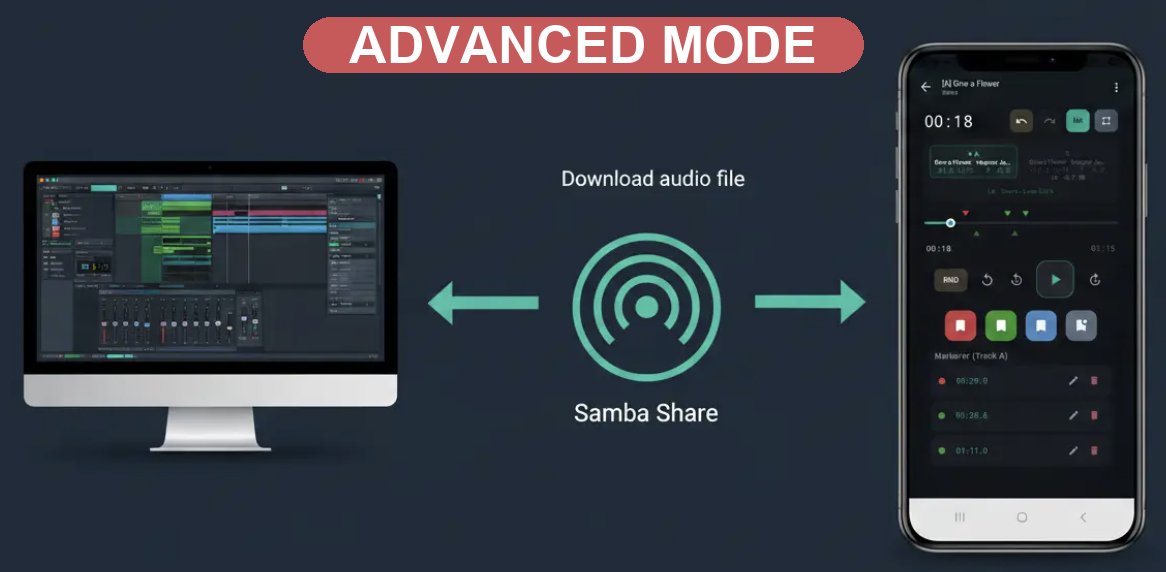
ZIP export with markers + audio. Direct SMB network export to Windows, macOS, Linux. Import audio files, ZIP exports, or from network shares.

📂

Projects (Pro)

Organise files into workspaces. Move files between projects. Cross-project search by name, ID3 metadata, marker notes, and tags.

📜

Playback History

Keep track of your sessions automatically. The dedicated Playback History screen retains your last 1,000 played tracks, supports file selections, A/B comparisons, custom metadata/project management, and is easily accessible from any player overflow menu.

🎵

ID3 Metadata

Auto-reads artist, title, album, composer, publisher, comment from MP3s (ID3v1/v2, Vorbis, MP4 atoms). Shown everywhere — library, player, lockscreen, search.

📱

Landscape Mode

Full landscape support across all screens — player, library, recorder, and project overview. Two-column layout in landscape for efficient use of screen space.

Built for

Whether you're reviewing mixes, practicing, or studying — AudioMark fits your workflow.

🎛️ Compare multiple mixes
🎸 Practice with looped segments
🤖 Review AI-generated music
📝 Annotate recordings
🎓 Study audio & lectures
🎙️ Review podcast edits
🏠 Import/export via SMB
🔊 Evaluate mastering passes
🎤 Record with USB interfaces
🎚️ Controlled recording levels
⏰ Automate playback routines

🔒 Privacy First

AudioMark works 100% offline with minimal data collection. No accounts, no ads, no in-app analytics, no tracking in the app itself. All your data stays on your device. Google Play Console automatically collects crash reports and performance metrics (see Privacy Policy for details). GDPR compliant. Designed following OWASP MASVS L1 guidelines.

No Cloud No In-App Analytics No Ads No Tracking (in-app) No Timestamps GDPR Compliant OWASP MASVS L1

👤 Built by One Developer

AudioMark is designed, built, and maintained by a single indie developer. It's a complex app — dual audio engine with real-time sync, DSP signal processing, EBU R128 loudness analysis, custom metadata readers, SMB networking, and three player modes in one screen. Every release is verified with a suite of 73 automated tests, automated Robot UI scripts, and structured manual checks on a real device, alongside personal usability checks to ensure everything feels just right. If you find a bug, please report it — I read every message and fix issues as fast as I can.

Release History

Follow the journey of AudioMark as we build the best mobile workflow for audio professionals.

v1.0.72 July 3, 2026

Stability & Performance

  • Stability & Performance: Technical fixes and performance improvements.
v1.0.71 July 2, 2026

Multi-Language Localization

  • 🌐 Multi-Language Support: Added complete localization support across the app. The application is now fully translated into English, German, Spanish, French, Portuguese, and Norwegian.
v1.0.70 June 30, 2026

Stability & Performance

  • Stability & Performance: Technical fixes and performance improvements.
v1.0.69 June 29, 2026

Stability & Performance

  • Stability & Performance: Technical fixes and performance improvements.
v1.0.68 June 29, 2026

Stability & Performance

  • Stability & Performance: Technical fixes and performance improvements.
v1.0.67 June 29, 2026

Android 15 Compatibility & Stability

  • Boot Service Restrictions: Fixed a startup issue where scheduled playback could fail to launch on device boot due to Android 15 background service restrictions.
  • Preferences Crash: Improved Jetpack DataStore loading reliability to prevent potential app crashes during startup.
v1.0.66 June 22, 2026

Playback History Cleanup & Playlist Polish

  • Playback History Cleanup: Removed the file deletion capability from the Playback History screen to prevent accidental file deletion. Added a dedicated button to deselect all active playlist selections instead, and corrected confirmation dialog labels.
v1.0.65 June 22, 2026

Playback History Navigation Hotfix

  • ⚙️ Playback History Polish: Fixed an issue where tapping a deselected currently playing track in Playback History would incorrectly open other selected files in A/B or Playlist modes.
v1.0.64 June 22, 2026

Playback History, 4-Band Mastering & Polish

  • 📜 Playback History Screen: Introduced a dedicated Playback History screen keeping track of your last 1,000 played tracks. It includes full support for file selections, A/B comparisons, custom metadata/project management, and is easily accessible from any player overflow menu.
  • 🎛️ 4-Band Mastering Console: Upgraded the Playlist Mastering compressor to a professional 4-band system (Bass, Low-Mids, High-Mids, and Highs) with fine-tuned cutoff parameters for vocal/string presence and weight in both Natural and Punchy profiles.
  • 🎵 Artist Info & Mini Player Polish: Added artist name display alongside track titles on both the persistent mini-player and the full player screen. Decoupled the player stop button from file selections, so stopping playback no longer clears your active playlist.
  • ✅ Search Playlist Management: Added checkboxes with ordered selection labels (e.g. 1, 2, 3...) to cross-project search result items, allowing you to add, remove, and sort files in the active playlist directly from search.
  • ⚡ Playback Mode & Row Tap: Tapping a row in selection mode now plays the file, restricting selection/deselection strictly to the checkbox. Resolved a race condition where starting a playlist could play a random track due to cross-mode mismatches.
  • 🔄 Preserve Search State: Going back from the player screen now correctly pops the backstack and preserves active search queries and results.
  • ⏳ Console State Polish: Persists the expanded/collapsed state of the mastering console to disk.
v1.0.62 June 18, 2026

Playback System & Shuffle Auto-Advance

  • ⚡ Playback System Fixes: Resolved A/B comparison playback failure and cutting off by adjusting buffer threshold limits.
  • 🎧 Shuffle Auto-Advance: Aligned playlist next-track predictions in the mastering console with ExoPlayer's natural shuffle transition sequence.
v1.0.61 June 14, 2026

Dynamic Range Processing & Look-Ahead Limiter

  • 🎛️ Dynamic Range Processing: Added Crest factor statistics and bypass control to the mastering console. Automatically detects high-dynamic-range tracks to bypass dynamics compression.
  • 🛡️ Look-Ahead Limiter: Integrated a brick-wall look-ahead limiter and slow-attack AGC envelope follower into the audio recorder pipeline for cleaner captures.
v1.0.60 June 14, 2026

Store Graphics & UI Polish

  • 🎨 Store Graphics: Updated the Play Store feature graphic layout to clean up the design and prevent overlapping on store displays.
  • 🌟 Direct Play Store Rating: You can now rate the app directly on the Play Store from the settings page, bypassing native rating limits.
  • 🐛 UI Bug Fix: Resolved a visual layout bug in the Project List screen where empty space could appear below list items.
  • ⚙️ Under-the-Hood: General internal improvements and stability optimizations.
v1.0.58 June 11, 2026

Brand Refinement & Stability

  • 🎨 Brand Refinement: Finalized high-quality rounded logo assets across the app and web for a premium studio aesthetic.
  • ⚙️ Stability: General performance optimizations and refined deployment logic for all testing tracks.
v1.0.56 June 11, 2026

Brand Refresh & "Always Dark" Startup

  • 🎨 Brand Refresh: Unified app branding with a new "Studio Dark" identity. The app icon now features a deeper, studio-inspired background for better visibility.
  • 🚀 "Always Dark" Startup: Re-engineered the launch sequence to eliminate the white screen flash. The splash screen and app icon now feature a consistent dark background that matches the AudioMark aesthetic, regardless of system settings.
  • 🌐 Web Presence: Updated the official website and documentation with the new visual identity.
  • ⚙️ Stability: Minor performance tweaks and refined resource management for smoother transitions.
v1.0.55 June 10, 2026

Stability & Memory Fix (Low-End Devices)

  • ⚙️ Low-End Device Optimizations: Significant performance and stability fixes specifically for budget devices with limited RAM. Reduced memory usage during audio analysis and optimized UI update cycles to prevent crashes on entry-level hardware.
  • 🚀 Efficient Zero-Allocation Decoding: Implemented a reusable processing buffer in the loudness engine, eliminating massive Garbage Collection spikes during file scanning.
  • 🎛️ Lazy DSP Loading: High-memory Mastering Rack components are now loaded lazily—only when "Pro Mode" is active—preserving system resources for playback.
  • ⚡ UI Throttling: Optimized real-time position updates to reduce CPU overhead during background playback.
v1.0.54 June 8, 2026

Loudness Engine Overhaul: Speed & Precision

  • 🚀 10x Faster Analysis: Completely rewritten core engine using an $O(1)$ Rolling Sum algorithm. High-speed loudness scanning is now limited only by your phone\'s hardware decoding speed.
  • 🧵 Dynamic Parallel Processing: Analysis now scales automatically based on your device\'s CPU cores (up to 8 parallel tracks), maximizing throughput while keeping the UI responsive.
  • 🎧 Robust High-Res Decoding: Fixed a decoding alignment bug that caused incorrect values (0 LUFS) on high-bitrate EDM tracks. Added support for 24-bit, 32-bit, and Float PCM.
  • 📊 Clinical Accuracy: Implemented BS.1770 gating (-70 LKFS) for professional-grade R128 loudness measurement.
  • 🛠️ Mastering Console Upgrade: Added an "ANALYZE REMAINING" button to fix unanalyzed tracks in your playlist with a single tap, plus clear "LM BYPASSED" status indicators.
v1.0.53 June 7, 2026

Robust Mastering & Clarity Update

  • 🛠️ Settings Reorganization: Playlist-specific settings are now grouped together in a dedicated section for better clarity and faster access.
  • ⚡ Robust Mastering: Improved hardware compatibility for "Pro Mode" Mastering. The app now actively detects your device's DSP capabilities and gracefully adjusts or falls back to Safe Mode to ensure 100% stability.
  • 🎵 Level Match Persistence: Manual Level Match toggles now stay active when skipping tracks in a playlist, maintaining your listening flow.
  • 🎻 Improved Defaults: "Natural" is now the default mastering character, providing a transparent and dynamic sound out-of-the-box.
  • 🎨 UI Refinement: Fixed a layout issue where settings sections could overlap on certain screen sizes.
v1.0.52 June 6, 2026

Mastering Presets: Natural & Punchy

  • 🎻 Mastering Presets: Introduced a new "Natural" tuning character for Pro Match. This preset preserves transients and dynamics, making it perfect for Classical, Jazz, and acoustic music.
  • 🚀 Punchy Sound: The existing mastering rack is now available as the "Punchy" preset for those who want a denser, more commercial feel for Pop and Rock.
  • 📍 Persistent Tuning: Your chosen tuning character is saved per session and persists across app restarts.
  • ⚡ Engine Refinement: Improved the real-time parameter update logic to allow switching between mastering presets without audio glitches.
v1.0.51 June 5, 2026

Stability & Performance Update

  • ⚙️ Reverted experimental Direct Boot and background logic to maintain 100% system stability across all Android devices.
  • 🚀 Playback reliability restored to the last known stable state (v1.0.47).
  • 🛠️ General maintenance and performance optimizations.
v1.0.47 June 5, 2026

Playlist Mastering Rack (2-Band Glue)

  • 🎛️ Playlist Mastering Rack: Upgraded to a professional 2-band mastering chain (Bass + Mid-High) for more clarity and power in playlist mode.
  • ⛓️ Glue Compressor: Added a dedicated glue compressor stage to smooth out dynamics without pumping, even on heavy tracks.
  • 🚀 Push Drive: Re-engineered makeup gain logic to drive the signal into the mastering rack for a denser, commercial sound.
  • 📍 Reliable State Sync: Resolved an issue where the mastering slider could get stuck when switching playlists or clearing selections.
v1.0.46 June 4, 2026

Android 15 Compliance & Boot Stability

  • 🛡️ Android 15 Compliance: Fixed a critical issue where the app could crash on boot due to new foreground service restrictions on Android 15 and higher.
  • 📍 Boot Reliability: Re-engineered the boot sequence to separate alarm re-scheduling from heavy audio engine components, ensuring a faster and safer startup.
  • 🔐 Service Security: Decoupled service-start logic from system broadcast receivers to meet the latest platform security standards.
v1.0.45 June 3, 2026

Reliable Sync & Scheduler Refinement

  • 📍 Reliable Selection Sync: Implemented a robust synchronization system to ensure playlist selections are saved and loaded correctly, resolving a race condition when switching tracks or stopping playback.
  • ⏰ Scheduled Playback Refinement: Professionalized the Scheduler UI. Improved state handling so that battery optimization and alarm permission status update automatically when returning from system settings.
  • 📋 Smarter Playlist Onboarding: Refined placeholder text to clearly differentiate between having no saved playlists and simply not having one selected for scheduling.
  • ⚡ Performance Tuning: Refined the internal DataStore flow to ensure the player always waits for preference updates to finish before initializing, guaranteeing consistency between the library and the player.
v1.0.43 June 2, 2026

Mastering Console & Predictive Shuffle

  • 🎛️ Playlist Mastering Console: A powerful new analytical overlay that turns your player into a live mastering suite. Monitor LUFS, peaks, and gain reductions in real-time at the bottom of the screen.
  • ⛓️ Professional FX Chain: Implemented a sophisticated multi-stage signal path with Global Balancing, an adjustable +15dB Makeup Gain slider, and your choice of Safe (Peak-Protect) or Pro (Brick-wall Limiter) protection modes.
  • 🔄 Predictive Random (Shuffle): Shuffle logic rewritten to pre-calculate the next random track "one step ahead." See the upcoming reduction and boost values in the console before you even hit skip.
  • 📜 Shuffle History Stack: Fixed navigation logic so the "Previous" button accurately tracks your manual random history, matching the Mastering Console’s history column.
  • ⚡ Instant Gain Toggling: Refined the audio engine so that Level Matching (LM) activates immediately on the current track without waiting for a song change.
v1.0.42 June 1, 2026

Pro Automation & Intelligent Volume

  • ⏰ Pro Scheduled Playback: Automate your listening with precision. Schedule any saved playlist to trigger at a specific time with a gentle 30-second volume fade-in—perfect for morning routines or automated environment checks.
  • 💡 Smart Volume Initialization: New "Intelligent Match" for playlists. The system automatically calculates the recommended boost level to hit the -14.0 LUFS standard the moment you load a new playlist.
  • 🎧 Broadcast-Grade Normalization: Shifted the playlist target to a professional -24.0 LUFS baseline for perfect relative balance, with dynamic headroom-aware makeup gain to match standard system volumes.
  • 🎙️ Enhanced Recording Dynamics: Re-tuned the AGC and limiter thresholds to provide even more headroom, ensuring zero True Peak clipping even in aggressive stereo environments.
  • 📍 Navigation Persistence: Added a new default setting for Level Matching and ensured all professional mastering tools are off by default for a clean out-of-the-box experience.
v1.0.41 May 26, 2026

Markers & Storage Intelligence

  • 📍 Marker List Auto-Scroll: The marker list now automatically follows your listening session. When you add a new marker, the list scrolls it into view with a smooth 50ms delay for visual stability.
  • 📊 Smart Storage Estimator: Added a real-time capacity counter to the Record screen. See exactly how many megabytes you have left and an estimate of how many hours/minutes you can record in your chosen format (WAV or AAC).
  • ✨ MiniPlayer Clarity: Updated the active playback label from \"LISTENING\" to \"PLAYING\" across all supported languages (English, German, Norwegian) for better consistency with modern media standards.
  • 📏 Precision UI: Fixed a layout issue in the Scheduled Playback dialog that caused incorrect padding on certain screen resolutions.
v1.0.40 May 26, 2026

Recording Workflow Refinement

  • 🎙️ Automatic Player Handoff: Fixed a regression where new recordings would not load automatically when initiated from the Single Player, ensuring a smooth transition for multiple takes.
v1.0.39 May 25, 2026

Stability & Navigation Improvements

  • 🛡️ Notification Permission Fix: Resolved a critical issue where the app could close immediately after granting permissions on certain device implementations.
  • 🎨 UI Layering Fix: Cleaned up the file import experience by removing a visual overlay glitch that appeared behind the network share dialog.
  • 📍 Origin-Based Routing: Improved navigation logic to ensure the player always returns you to the correct project or library context you started from.
  • ⏺️ Post-Recording Flow: Fixed a behavior where saving a new recording would bypass the player and jump prematurely to the project overview.
  • 🔄 Callback Sync: Synchronized technical signatures between search and playback engines for a more reliable cross-project workflow.
v1.0.38 May 24, 2026

Major Updates & Android 15 Support

  • ⚡ Hardware Priming Engine: Implementation of a 150ms hardware "warm-up" that ensures completely gapless and skip-free transitions when starting or switching tracks.
  • 📁 SMB/Network Import: Expanded network capabilities to include direct import of audio files and full AudioMark project ZIPs from Windows/SMB shares.
  • 📱 Redesigned MiniPlayer: Relocated controls to the bottom of the screen for better one-handed reachability and accessibility across all devices.
  • 🔍 Integrated Search Overlay: A revamped, high-performance search experience that lets you find markers, files, and tags instantly without shifting the UI layout.
  • 🔄 Format Mismatch Assistant: Smart detection of audio format differences in A/B mode with automated high-quality WAV conversion to guarantee perfect synchronization.
  • 📊 Advanced A/B Visualization: Added visual duration comparisons and time-difference indicators to help you identify track variations more easily.
  • ✨ Android 15 Optimization: Full support for Edge-to-Edge layouts and the latest OS requirements for a modern, immersive user experience.
  • 📜 Perfect Scroll Persistence: Navigation state is now fully preserved, ensuring you never lose your spot in long file lists when returning from the player.
  • 🚀 Zero-Flash Startup: Optimized app initialization and theme syncing to eliminate white screen flashes during launch.
  • 💡 Keep Screen On Setting: Added a dedicated toggle in settings to prevent your device from sleeping during critical listening or recording sessions.
v1.0.31 May 8, 2026

Initial Release

  • First public release of AudioMark.
  • Foundation of the audio playback and marker workflow.
  • Initial Android availability.

Get in Touch

Found a bug, have a feature request, or just want to say hi? I'd love to hear from you.

Ready to listen?

Download AudioMark for free on Google Play. Pro unlocks projects, unlimited files, and saved playlists.

▶ Get it on Google Play